【Maya 2024-2027】HT Deferred|リアルタイムGI・反射・ソフトシャドウのビューポートレンダラー(DLSS対応)
- ダウンロード商品¥ 0無料ダウンロードHTDeferred_Maya2024-2027_v0.2.1.zip(84.3 MB)HTDeferred_Maya2024-2027_v0.2.1.zip
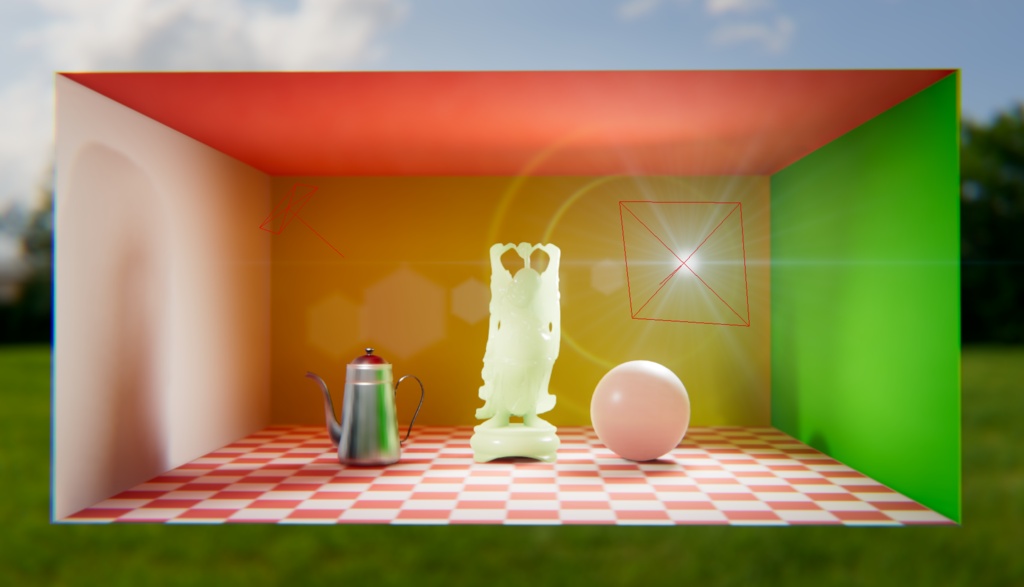
Mayaのビューポートを、ゲームエンジンのようなディファードレンダラーに置き換えるプラグインです。Arnoldの aiStandardSurface やライトをそのまま読み込み、GI(間接光)・反射・エリアライトのソフトシャドウ・SSS・AO・被写界深度などを、ビューポート上でリアルタイムに確認できます。ライティングやルックの当たりを、レンダリングを待たずに作れます。 ※試作段階(v0.1.0)です。Mayaの機能すべてを検証していないため、使えないケースがある場合があります。 ※次のアップグレードで無料期間は終了になります。 なるべくいいねやXでコメントいただけると、続きの開発やる気がでます!よろしくお願いします!
主な機能
・GI:Screen Probe(既定)/Raytrace(サーフェルキャッシュ付き) ・反射:Raytrace/Environment(aiSkyDomeLight)/Screen Probe ・エリアライトのソフトシャドウ、SSS、屈折 ・AO:VBAO/SSAO ・NVIDIA DLSS(超解像+アンチエイリアス)、デノイザー(Native filter/OIDN/NRD) ・ポストエフェクト:被写界深度(オートフォーカス付き)、グレア、カラーグレーディング、ビネット、フォグ、レンズフレアなど(HT Post Processing の機能を統合) ・メッシュデカール:Unreal風にチャンネルごと(色・ラフネス・メタルネス・法線)に重ねられます。Arnoldのレンダリングでも同じ見た目になります ・4分割ビュー対応、モデリング中の編集も軽快に更新 ※試作段階(v0.1.0)です。Mayaの機能すべてを検証していないため、使えないケースがある場合があります。
インストール方法
1. Mayaで ウィンドウ → 設定/プリファレンス → プリファレンス → ディスプレイ を開き、レンダリング エンジン を DirectX 11 に変更して、Mayaを再起動します。 2. ZIPを好きな場所に展開します(日本語を含まないパス推奨)。インストール後もこのフォルダを使うので、移動・削除しないでください。 3. 展開したフォルダの install.mel を、Mayaのビューポートにドラッグ&ドロップします。 4. シェルフに「HTDeferred」タブが追加され、ビューポートが HT Deferred に切り替わります。Arnoldでデカールを使う場合は、Mayaを一度再起動してください。 ※1.はハマりポイントです。プラグインを読み込む前に DirectX 11 に変更しておいてください。
使い方
シェルフ「HTDeferred」のボタンを使います。 HT:HT Deferred に切り替え VP2:Viewport 2.0 に戻す Opt:オプション(GI・反射・影・SSS・AO・DLSS・ポストエフェクトなど) Decal:選んだメッシュをデカールにする Recv:選んだメッシュでデカールを受ける 詳しくは同梱の README_ja.txt をご覧ください。
動作環境
Windows版 Maya 2024/2025/2026/2027(Viewport 2.0・DirectX 11) Arnoldのデカールは各Mayaに対応したMtoA(Arnold 7.2〜7.5)で動作します。 NVIDIA GeForce RTX 推奨(DLSS・OIDNはNVIDIA GPUが必要です。対応していない場合、DLSSは自動でOFFになります)
同梱内容
プラグイン本体(Maya 2024〜2027用)、シェーダー、Pythonスクリプト、Arnold用デカールシェーダー、インストーラー、ガイド(日本語・英語)、使用許諾契約書(日本語・英語)、サードパーティライセンス
ライセンス
同梱の使用許諾契約書(EULA)に基づいてご利用いただけます。購入者ご本人が使用でき(複数台へのインストール可)、制作物は商用を含め自由にお使いいただけます。本ソフトウェアの再配布・転売・共有は禁止です。 © 2026 H.T. This software uses NVIDIA DLSS and NVIDIA Real-time Denoisers. NVIDIA, NVIDIA RTX and DLSS are trademarks of NVIDIA Corporation. Maya and Arnold are trademarks of Autodesk, Inc.
更新履歴
2026-11-24 - v0.1.0 リリース 2026-11-24 - v0.1.1 2024,2025,2027に対応、playblastに対応 2026-11-25 - v0.1.2 反射の品質を改善(鏡面反射のノイズ除去、ソフトエッジの反射、粗さに応じたフィルタ)/サブディビジョンした曲面の影のまだらを修正/リフレクションOFF時に環境の映り込みも消えるように/Maya終了時のクラッシュを修正 2026-11-25 - v0.2.0 ・空:独自の大気、ボリュメトリック雲、巻雲、雲の影、ゴッドレイ、Time of Day、夜空(月・星・天の川) ・オプションのプリセット保存 ・フォグ / VDB ボリューム、Maya 標準ライト対応 2026-11-26 - v0.2.1 ・Sky と Post Effects の設定を専用ウィンドウに分けた ・時刻スライダーをドラッグ中もリアルタイムで反映 星を明るくし、夕方に空が暗くなりすぎるのを修正 太陽の影をきれいにした ・既定値を変更(露出 2 EV、Time of Day オンで 14時) ・屈折オンでガラス越しの色が消える不具合を修正 4分割表示で固まる不具合を修正 ・設定ノード名を htDeferredSettings に変更(古いシーンも自動で引き継ぎ)
English
HT Deferred replaces Maya's viewport (Viewport 2.0) with a game-engine-style deferred renderer. It reads your Arnold aiStandardSurface materials and lights as they are, and shows global illumination, reflections, soft shadows, SSS, AO and depth of field in real time, so you can work on lighting and look-dev without waiting for renders. * Early version (v0.1.0): not every Maya feature has been tested, and some cases may not work. * The free period ends with the next upgrade. * Likes on BOOTH and comments on X are very welcome - they keep the development going! [Features] - GI: Screen Probe (default) / Raytrace, with a surfel cache - Reflections: Raytrace / Environment (aiSkyDomeLight) / Screen Probe - Area light soft shadows, SSS, refraction - AO: VBAO / SSAO - NVIDIA DLSS (upscaling + anti-aliasing); denoisers: Native filter / OIDN / NRD - Post effects: depth of field with autofocus, glare, color grading, vignette, fog, lens flare and more - Mesh decals, Unreal-style per channel (color, roughness, metalness, normal), with the same look in Arnold renders - Four-view layouts, fast updates while modeling [Installation] 1. In Maya, go to Windows > Settings/Preferences > Preferences > Display and set Rendering engine to DirectX 11, then restart Maya. (Do this before loading the plugin.) 2. Unzip the package anywhere (an ASCII-only path is recommended). Maya keeps using this folder, so do not move or delete it. 3. Drag and drop install.mel from the unzipped folder into a Maya viewport. 4. An "HTDeferred" shelf is added and the viewports switch to HT Deferred. Restart Maya once to use the Arnold decals. [Usage] Shelf buttons: HT (switch to HT Deferred) / VP2 (back to Viewport 2.0) / Opt (options) / Decal (make decals) / Recv (receive decals). See README_en.txt for details. [Requirements] Windows, Maya 2024 / 2025 / 2026 / 2027 (Viewport 2.0, DirectX 11). Arnold decals work with each Maya's MtoA (Arnold 7.2 - 7.5). NVIDIA GeForce RTX recommended (DLSS and OIDN need an NVIDIA GPU; DLSS turns off by itself otherwise). [Included] Plugin, shaders, Python scripts, Arnold decal shaders, installer, guides (English / Japanese), EULA (English / Japanese), third-party licenses [License] Use is governed by the included EULA. The purchaser may use it on any number of their own computers, and your work made with it is yours to use, including commercially. Redistributing, reselling or sharing the software is prohibited. (c) 2026 H.T.
今後の対応予定
・半透明の改善 ・maya標準ライトへの対応 ・maya標準シェーダーへの対応 ・xgenの対応 ・パフォーマンスの改善 ・デカールの改良 ・他使用して気づいたところを直していきます。